

Free tools Sticker Book for Kids
Free · no login · nothing uploaded
My Sticker Book: Free Reward Stickers for Learning
Every letter your child traces, every picture they colour and every Play & Learn quiz they finish adds a sticker here. They can see what they have collected, what is still to earn, and the badges they are working towards. No account and no app: the stickers live only in this browser.
My sticker book
No stickers yet. Earn the first one: trace a letter, colour a picture or play a quiz.
Newest stickers
🔒 Nothing is uploaded. Stickers are saved only in this browser on this device: no account, no sign-up, and no one else can see them. Clearing your browser data removes them, so use “Save a backup” to keep them or move them to another phone.
How to use it
- Earn stickers on Parent Oven: trace a letter or number with a finger, colour a picture and tap the star when it is done, or finish a picture quiz.
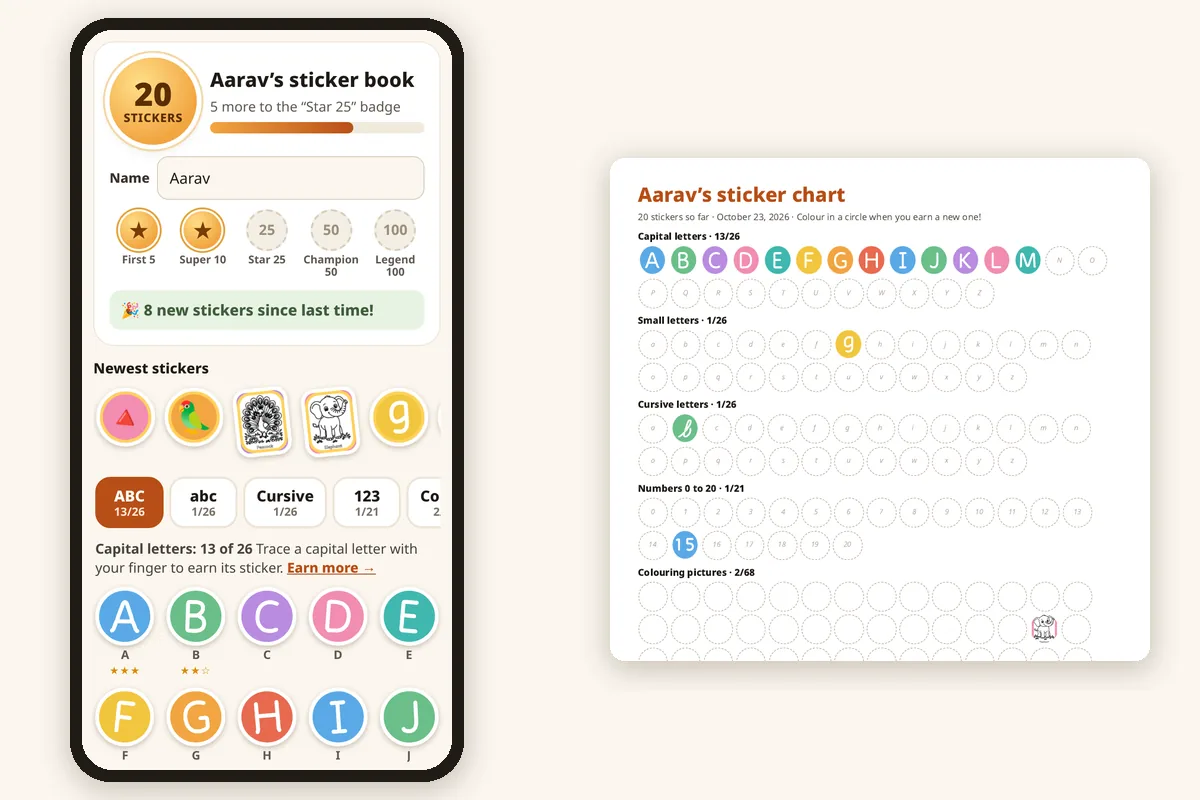
- Come back to this page. New stickers pop in, and the big gold circle shows the total.
- Tap the albums (ABC, abc, Cursive, 123, Colour, Quizzes) to see each set. Empty circles show what is still to earn; tap one to go straight to it.
- Type your child’s name if you like, so it becomes “Aarav’s sticker book”.
- Tap Print my sticker chart for a one-page chart (A4 or US Letter) of everything earned so far. Children can colour in a circle each time they earn a new sticker.
- At 10 stickers a Make a certificate button appears, with your child’s name already filled in.
Why it helps
Children love collecting. A sticker for each finished letter turns practice into a visible goal (“only three letters left!”), and seeing the whole alphabet fill up shows progress far better than a score that disappears.
The stars are earned for real effort: tracing earns three stars for staying on the line, and quiz stars depend on right answers at the first try. The sticker book keeps the best stars, so trying again is always worth it.
Most reward apps want an account, an email address or a download. This one has none of that, and nothing your child does is sent anywhere.
Parent tip
Praise the effort, not the sticker: “You kept trying with that G until it was neat!” Rewards work best as a celebration of what your child did, and fade naturally as the habit takes over.
Pick one small goal together, such as “all the letters in your name this week”, rather than chasing all 195 stickers. Short, regular sessions of 5 to 10 minutes beat a long one on the weekend.
Which album to start with
| Age | Good first album |
|---|---|
| 2–3 years | Colour (tap to fill) and the picture quizzes, with you naming things together. |
| 3–4 years | Capital letters (ABC) and numbers 0 to 10, starting with the letters in their name. |
| 4–6 years | Small letters (abc), numbers to 20, and all the quizzes. |
| 6–8 years | Cursive letters, once small letters are confident. |
Example
More free printables
Questions
Is anything uploaded? Do I need an account?
No and no. Stickers are saved only in this browser’s own storage on this device (localStorage). Nothing is sent to us or anyone else, and there is no sign-up.
Why have my stickers disappeared?
They are kept by the browser, so they vanish if browser data is cleared, in a private or incognito tab, or if you open the site in a different browser or app (for example a link opened inside WhatsApp or Instagram). Use the same browser each time, and tap “Save a backup” now and then.
Can I move the stickers to another phone?
Yes. Tap “Save a backup” to download a small file, send it to the other phone, then open this page there and tap “Load a backup”. Stickers are added, never removed.
I have two children. Can they each have a book?
Each browser holds one sticker book. Easiest is one child per device, or save a backup for each child and load the right one when it is their turn.
How many stickers are there?
195: 26 capital letters, 26 small letters, 26 cursive letters, 21 numbers (0 to 20), 68 colouring pictures and 8 picture quizzes. New activities will add more.
More Free Tools
Also try: Play & Learn quizzes · all free tools